



You just spent $1,200 on a new laptop. You zip it into your backpack, toss the bag into the overhead bin, and wince when it hits the sidewall. This is the moment you realize that not all backpacks are created equal. A great travel backpack with laptop compartment does more than carry your gear—it protects your most expensive device from bumps, drops, and spills. Whether you are a digital nomad, a weekend traveler, or a daily commuter, choosing the right bag means the difference between arriving with a working laptop and a cracked screen. Let us walk through exactly what to look for so you never have to experience that sinking feeling again.
What Makes a Travel Backpack Safe for a Laptop?
A safe laptop backpack uses a dedicated, padded compartment that suspends the device away from the bottom of the bag. This prevents damage when you set the pack down hard. The compartment should be fleece-lined or have a soft interior to prevent scratches, and the padding should be at least 15mm thick on all sides.
Look for a “false bottom” design. This means the laptop sleeve does not go all the way to the bottom of the bag. If you drop the backpack, the laptop stops about an inch above the ground, absorbing the shock through the extra material. Many cheap backpacks skip this feature, so check by feeling the bottom of the sleeve before buying.
Key protection features to verify:
- Padded sleeve that fits your laptop size snugly
- Raised bottom (false bottom) of at least 1–1.5 inches
- Water-resistant or waterproof fabric in the laptop area
- Separate zippered compartment to keep the laptop away from other items
- Reinforced stitching around the zipper tracks
Why Is a Dedicated Laptop Compartment Better Than a Sleeve?
A dedicated laptop compartment offers three advantages over a simple sleeve: impact separation, organization, and access speed. When your laptop shares a main compartment with clothes, cables, and water bottles, those items can press into the screen or scratch the casing during transit.
A separate compartment keeps the laptop isolated. Many modern travel backpacks use a “clamshell” or “panel-loading” design where the laptop section opens 180 degrees. This makes going through airport security effortless because you can pull out the laptop without digging through dirty laundry. Additionally, a dedicated compartment often sits against your back, which naturally stabilizes the laptop and reduces movement while walking.
Which Backpack Size Works Best for a Laptop While Traveling?
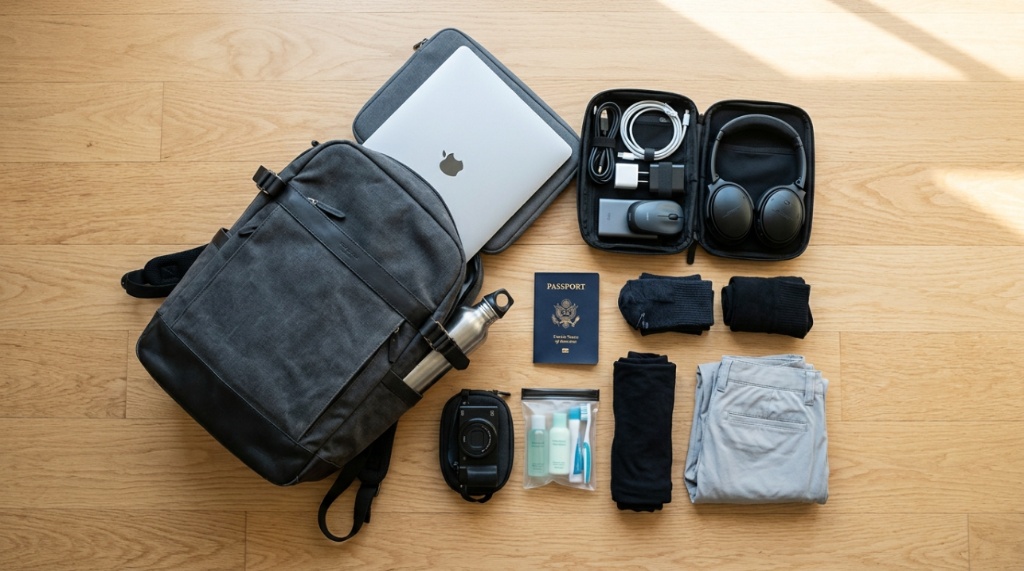
For most travelers, a 25-to-35-liter backpack provides the best balance of carrying capacity and laptop protection. This size fits under most airline seats and in overhead bins while still accommodating a 15- or 16-inch laptop comfortably.
If you carry a larger 17-inch laptop, look for bags in the 35-to-40-liter range. Be aware that anything above 40 liters often gets flagged as a carry-on and may not fit under the seat. For a 13-inch ultrabook, a 20-to-25-liter pack is sufficient and offers better portability.
How Should a Laptop Travel Backpack Fit Your Body?
A properly fitted backpack transfers weight from your shoulders to your hips, reducing strain during long walks through airports. The top of the backpack should sit level with your shoulders, and the bottom should rest at your hipbone, not below it.
When testing a bag, load it with your laptop and a few heavy items. Adjust the sternum strap across your chest and tighten the hip belt. The laptop compartment should sit against your upper back, not sagging toward your lower spine. If the bag pulls backward at the shoulders, the laptop compartment is too low or the pack is too large for your torso length.
Fit checklist:
- Hip belt wraps around your hipbones, not your waist
- Sternum strap sits 1–2 inches below your collarbone
- Load lifters (straps above your shoulders) angle at 45 degrees
- Back panel length matches your torso measurement
What Features Protect a Laptop From Theft While Traveling?
Theft protection starts with access control. A laptop compartment that opens against your back is far harder for a pickpocket to access in a crowded train station than one that opens on the front or side. Some backpacks include a hidden zipper pocket in the laptop area for passports or backup drives.
Another useful feature is a lockable zipper. Many travel backpacks have two zipper pulls that can be locked together with a small padlock or a combination lock. Some bags also include a RFID-blocking pocket inside the laptop compartment to protect credit cards and passports from electronic theft. For extra security, choose a backpack with a slash-proof material like Dyneema or reinforced Kevlar webbing in the straps.
Can a Travel Backpack With a Laptop Compartment Double as a Daypack?
Yes, many backpacks in the 25-to-30-liter range work perfectly for both travel and daily use. The key is finding a bag with a removable or stowable hip belt and compression straps. When you travel, you use the hip belt and load the pack fully. When you arrive at your destination, you remove the belt and use the bag as a daypack for sightseeing.
Look for a bag that collapses or compresses when not fully loaded. Some backpacks have side compression straps that cinch down the volume, making the bag sleeker for city walks. A clean, minimalist exterior without too many straps or carabiner loops also helps the bag blend in as a daypack rather than screaming “tourist.”
Which Materials Offer the Best Laptop Protection?
Ballistic nylon (840 denier or higher) and Cordura fabric offer excellent abrasion resistance and water repellency for laptop protection. These materials hold up to airport conveyor belts, rain, and rough handling without tearing. For the laptop compartment itself, look for a lining made of padded nylon or polyester with a foam core.
Waterproofing matters more than you might think. A bag with a coated zipper or a simple rain cover keeps your laptop dry during sudden downpours. Some premium backpacks use waterproof YKK AquaGuard zippers directly on the laptop compartment. If you travel to rainy climates, also check whether the bottom of the bag has reinforced waterproof material—many laptops get damaged when you set a wet bag on the floor and water seeps through the bottom fabric.
How Do You Test a Backpack for Laptop Protection Before Buying?
You can test a backpack for laptop protection in a store or at home using a simple drop test. Place a hardcover book (roughly the same weight as your laptop) inside the laptop compartment. Raise the bag to waist height and let it drop flat onto a hard floor. Listen for the sound—a dull thud means the padding absorbed the impact, while a sharp crack means the book hit the ground directly.
Also try the shake test. Zip a tablet or book into the laptop compartment and shake the bag vigorously for ten seconds. If you hear the item moving or sliding, the compartment lacks proper retention—your real laptop would bounce around during a flight bump. Finally, check the zipper track by running it along the compartment edge; a smooth, padded track indicates quality construction that will keep the laptop secure for years.
What Are the Top Mistakes People Make When Choosing a Laptop Travel Backpack?
The most common mistake is buying a backpack that is too large. Travelers often think bigger is better, but a 50-liter pack becomes a burden when you only need to carry a laptop and a few outfits. Oversized bags also put more pressure on the laptop compartment because clothes and gear can shift and press against the device.
Another frequent error is ignoring the weight of the bag itself. Some heavy-duty backpacks weigh over four pounds empty. By the time you add a laptop, charger, and accessories, you could be carrying seven pounds before you pack any clothes. A good travel backpack with laptop protection should weigh between two and three pounds empty.
Lastly, many people forget to check the laptop compartment height. A 15-inch laptop needs a compartment that is at least 15.5 inches tall. Always measure your laptop’s dimensions and compare them to the compartment specifications, not just the screen size.
How Do You Care for a Travel Backpack With a Laptop Compartment?
Regular maintenance extends the life of both the bag and your laptop protection. After each trip, empty the bag and shake out debris from the laptop compartment—small crumbs or sand can scratch the laptop surface over time. Wipe the interior with a slightly damp microfiber cloth to remove dust.
For waterproofing, reapply a fabric sealant (like Nikwax or Scotchgard) every six months if you travel frequently. Treat the laptop compartment especially well, as this area experiences the most wear from sliding laptops in and out. Check the zippers every few months and lubricate them with zipper wax or silicone spray if they start sticking. Store the bag with the laptop compartment slightly open to prevent the foam padding from developing permanent creases.
For a closer look at some of the most reliable models currently available, you can explore this curated list of the laptop travel backpack with laptop compartment options that balance price with protective quality.
Is a Hard-Shell Laptop Compartment Worth the Extra Cost?
A hard-shell laptop compartment provides maximum impact protection but adds weight and reduces flexibility. These compartments use a molded plastic or EVA foam shell that keeps the laptop rigidly in place. They are ideal for extreme travel conditions like hiking, biking, or climbing where falls are more likely.
For standard air travel, train commuting, or office use, a well-padded soft compartment offers sufficient protection without the bulk. Hard-shell compartments also reduce the usable space in the backpack because the shell takes up volume. Unless you regularly transport your laptop in checked luggage or through rough terrain, a premium soft compartment with 20mm of padding and a false bottom is the better everyday choice.
Frequently Asked Questions
Can I put a 17-inch laptop in a backpack meant for 15 inches?
You can try, but the laptop will not sit flat inside the padded sleeve. This leaves the corners exposed to impact. If the compartment is too shallow, the top of the laptop may stick out, preventing the zipper from closing fully and leaving gaps for rain or dust to enter.
Should I remove my laptop from the backpack during TSA security?
Yes, unless your backpack has a TSA-approved laptop compartment that lays flat for X-ray scanning. Most airports require laptops to be removed from bags and placed in separate bins. A clamshell-opening laptop compartment makes this removal and replacement much faster.
How often should I replace my laptop travel backpack?
Replace your backpack every two to three years if you travel weekly, or every four to five years for occasional use. Watch for worn zippers, compressed padding, or tears in the laptop compartment—any of these mean the bag no longer offers reliable protection.
Can a laptop travel backpack also fit a tablet?
Many modern travel backpacks include a separate padded tablet sleeve inside or adjacent to the laptop compartment. This allows you to carry both devices securely without them rubbing against each other. Check the product specs for a “tablet sleeve” or “device pocket” before purchasing.
What is the best way to pack a laptop travel backpack?
Place the laptop in its dedicated compartment first. Then pack heavier items like books and toiletries closest to your back, and lighter items like clothes toward the front. This keeps the center of gravity near your spine and prevents the laptop from being pressed by shifting gear.
Do all travel backpacks with laptop compartments have padded straps?
Most quality backpacks include padded shoulder straps, but the padding quality varies. Look for straps that are at least 2 inches wide with 10mm of foam padding. Wider straps distribute the weight of your laptop and gear more evenly across your shoulders, preventing pressure points.
Is water resistance in the laptop compartment essential?
Yes. Even if the outer fabric is waterproof, condensation from your back or a spilled water bottle can damage a laptop through the interior of the bag. A separate water-resistant liner or coating inside the laptop compartment provides an essential second layer of protection against moisture.
While a tech-focused pack is ideal for digital nomads, if your trip requires flexible packing space instead of dedicated sleeves, consider swapping to a Durable Travel Duffel Bag for Everyday Use to handle bulkier gear.
Conclusion
Choosing a travel backpack with laptop protection does not have to be overwhelming. Focus on three non-negotiable features: a padded, suspended compartment with a false bottom, water resistance in the laptop area, and a fit that puts the weight on your hips rather than your shoulders. Ignore marketing jargon and test the bag with your actual gear before committing. A well-chosen backpack protects your laptop for years, saves you from expensive repair bills, and makes every trip smoother. Take your time, compare a few models, and invest in a bag that treats your laptop as carefully as you do.
